This extension provides developer tooling for Unified Robot Description Format (URDF) and Xacro Editing and Preview.
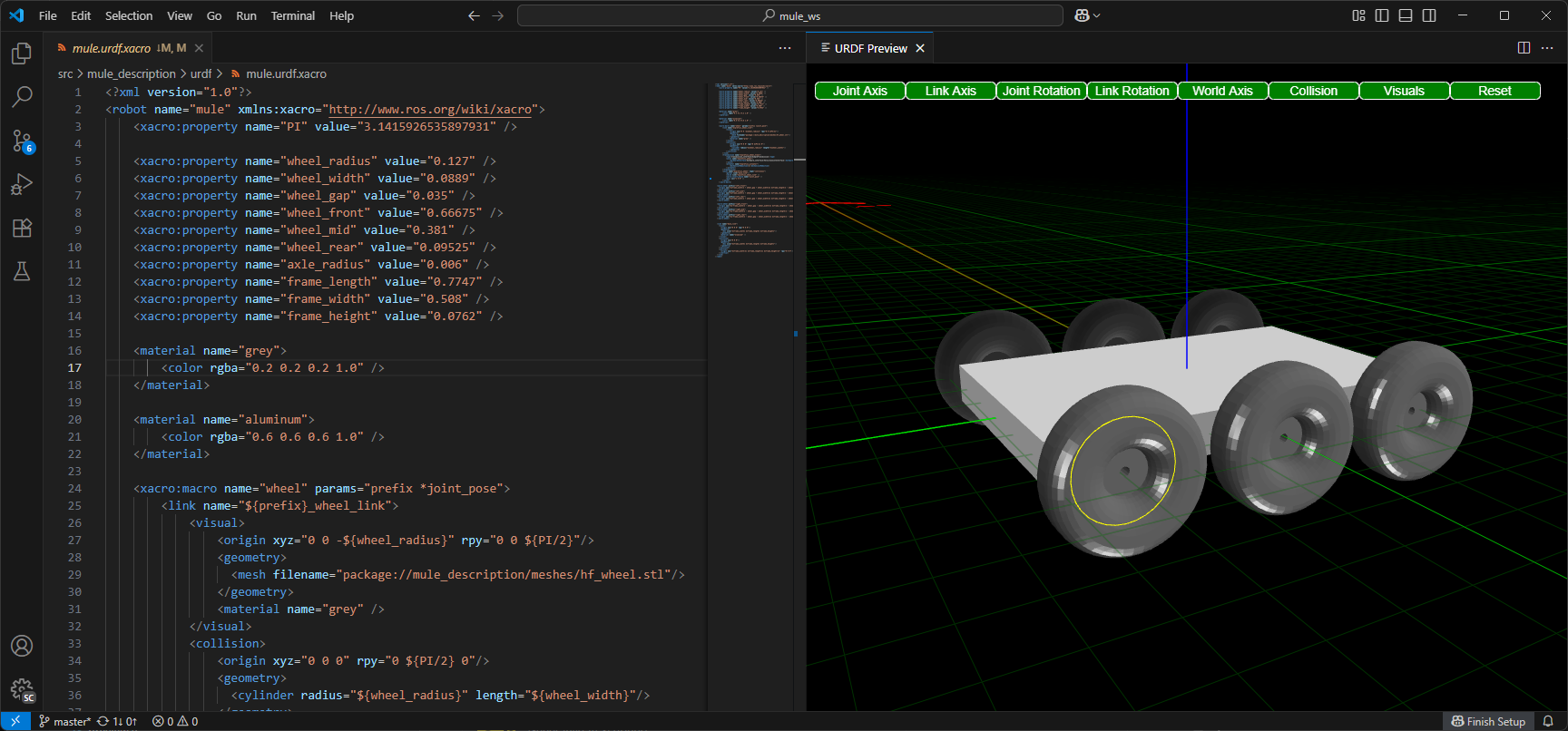
- 3D Preview: Real-time rendering with BabylonJS engine
- Link & Joint Visualization: Visual representation of robot structure
- Interactive Controls: Camera controls, rotation gizmos, and axis visualization
- Collision Visualization: Toggle collision geometry display
- Schema Validation: XML schema validation for URDF and Xacro files
- Syntax Highlighting: Full syntax support for URDF, Xacro, and OpenSCAD
- Go to Definition (F12):
- Jump to URDF links, joints, xacro macros, and properties
- Navigate to OpenSCAD modules and functions across files
- Resolve package paths and file references
- Cross-file symbol resolution via includes
- Enhanced Hover Documentation:
- URDF/Xacro elements with full XML signatures and inline attributes
- OpenSCAD modules/functions with parameters from comments
- Built-in element documentation with types and defaults
- Source file location for imported definitions
- Code Completion:
- URDF/Xacro element snippets with placeholders
- OpenSCAD built-in functions and transformations
- Xacro property reference completion (
${}) - Contextual suggestions based on cursor position
- Integrated Editing: Full OpenSCAD language support with syntax highlighting
- Live Preview: Automatic STL conversion and 3D rendering
- Library Management: Automatic discovery of libraries from workspace and system paths
- Performance Optimizations: Fast preview mode with configurable timeouts
- Documentation Generation: Extract module/function docs from comments
- Snippets: Common OpenSCAD patterns for quick coding
- Color Settings: Background, grid, and mirror customization
- Camera Configuration: Distance, angles, and view presets
- Grid Properties: Line color, spacing, opacity controls
- Mirror Effects: Reflective ground plane with configurable reflectivity
- Debug UI: Optional BabylonJS inspector for advanced debugging
- GitHub Copilot Integration: Custom prompts for URDF/Xacro/OpenSCAD
- Model Context Protocol (MCP) Server: AI visual verification tools
- Screenshot capture of 3D previews
- OpenSCAD validation and error checking
- OpenSCAD library documentation access
- Visual feedback loop for code generation
- Vibe Coding: AI can see rendered output and suggest improvements
- WebXR Preview: Immersive VR viewing of robot models
- Interactive Exploration: Navigate and inspect models in VR
- Learn more about WebXR
- Open a URDF, .xacro, or OpenSCAD file
- Right-click and select "Preview" or press
Ctrl+Shift+P→ "URDF: Preview" - Use F12 (Go to Definition) on any link, joint, or module name to navigate
- Hover over elements to see inline documentation with parameters
- F12 on link/joint names → Jump to definition
- F12 on xacro macro calls → Jump to macro definition
- F12 on OpenSCAD module calls → Jump to module (even in libraries)
- F12 on file paths → Open the referenced file
- Hover on elements → See full signature with parameters and types
For detailed configuration options, see the Configuration Guide.
The extension automatically loads OpenSCAD libraries from:
- SCAD file directory: The directory containing the SCAD file (highest priority). Only this directory and its subdirectories are loaded from the workspace.
- OS-specific default paths:
- Windows:
%USERPROFILE%\Documents\OpenSCAD\libraries - Linux:
$HOME/.local/share/OpenSCAD/libraries - macOS:
$HOME/Documents/OpenSCAD/libraries
- Windows:
Performance Note: The workspace root is no longer automatically included to avoid copying large directories like .git, node_modules, or virtual environments. Files in the same directory as the SCAD file can still reference each other.
To add additional custom library paths:
- Open VS Code settings (
Ctrl+,) - Search for "urdf-editor.OpenSCADLibraryPaths"
- Add additional library directories (supports
${workspaceFolder}variable)
Example settings.json:
{
  "urdf-editor.OpenSCADLibraryPaths": [
    "${workspaceFolder}/scad_libs",
    "C:\\MyLibraries\\OpenSCAD",
    "/usr/local/share/openscad/libraries"
  ]
}The extension automatically discovers ROS packages from:
- Workspace folders: Current VS Code workspace directories
- ROS distro directory: System-installed ROS packages (configured via
ROS2.distroandROS2.pixiRoot) - User-specified search paths: Additional directories you configure
How it works: The extension scans for package.xml files and extracts package names from the <name> element to build a package-to-path mapping.
To add custom package search paths:
- Open VS Code settings (
Ctrl+,) - Search for "urdf-editor.PackageSearchPaths"
- Add additional directories to search for ROS packages
Example settings.json:
{
  "urdf-editor.PackageSearchPaths": [
    "${workspaceFolder}/../other_ws/src",
    "/opt/ros/custom_distro/share",
    "/home/user/ros_packages"
  ]
}
Variable Substitution:
${workspaceFolder}is replaced with your workspace root directory
Package Precedence:
- Workspace packages take precedence over ROS distro packages
- This allows you to override system packages with local development versions
ROS Distro Configuration: The extension also supports ROS2 extension settings for automatic ROS distro discovery:
{
  "ROS2.distro": "kilted",
  "ROS2.pixiRoot": "/path/to/pixi/ros/installation"
}
If pixiRoot is set, the extension uses ${pixiRoot}/share for ROS packages. Otherwise, it defaults to /opt/ros/${distro}/share.
The extension can automatically generate documentation for your OpenSCAD libraries:
- Open the command palette (
Ctrl+Shift+P) - Run "URDF: Generate OpenSCAD Libraries Documentation"
- Choose where to save the markdown file
- The extension will scan all library paths and extract:
- Header comments from library files
- Module and function signatures
- Parameter documentation
- Usage examples
This documentation is also available to AI assistants via the Model Context Protocol (MCP) for intelligent code completion and suggestions.
The extension includes an MCP server that provides AI assistants with powerful capabilities:
- Screenshot Tools: AI can capture and verify visual output of URDF/Xacro/OpenSCAD files
take_screenshot: Screenshot of currently active previewtake_screenshot_by_filename: Screenshot any file by path (opens preview if needed)
- OpenSCAD Validation: AI can check OpenSCAD files for compilation errors before declaring completion
validate_openscad: Validates an OpenSCAD file by attempting to compile it and returns any syntax or compilation errors- Supports both file paths and inline content validation
- Returns detailed error messages and warnings
- Library Documentation: AI can access comprehensive OpenSCAD library information
get_openscad_libraries: Returns markdown documentation of all available libraries
The MCP server starts automatically when you open a preview and is accessible via HTTP on port 3005 (configurable).
If you encounter any issues with this extension, the following resources are provided:
Bugs and feature requests are handled through Github Issues in the Repository. If you find that you are hitting the same issue as someone else, please give a 👍 or comment on an existing issue. Please provide as much details as possible, including an isolated reproduction of the issue or a pointer to an online repository.
Github Discussions are provided for community driven general guidance, walkthroughs, or support.
If you find this extension useful, please consider sponsoring Ranch Hand Robotics to help support the development of this extension and other open source projects.
I was the maintainer of Microsoft's Visual Studio Code ROS Extension. It is no longer maintained, and I've been given permission to externalize the components. The URDF editor was built on work done in my private personal time, and not associated with Microsoft. This extension is a stand alone implementation and will be maintained moving forward.
This extension relies on the Xacro-Parser by GKJohnson for stand alone Xacro parsing without requiring ROS.
This extension also uses the openscad-wasm-prebuilt package for OpenSCAD processing, which is a prebuilt version of OpenSCAD for use in web applications. Important: This package is licensed under GPL-2.0-or-later.
The code for this extension unapologetically uses AI generated code.
Some of the code in this extension is based on the Visual Studio Code ROS Extension which is licensed under the MIT License. It also depends on Babylon ROS and Babylon Collada Loader by Polyhobbyist, both of which are MIT licensed.
Important Licensing Note: This extension includes the GPL-2.0 licensed openscad-wasm-prebuilt dependency. While the main extension code is MIT licensed, the combination creates a complex licensing situation. Please see:
- LICENSE-COMPATIBILITY.md - Comprehensive licensing guide and compliance checklist
- THIRD_PARTY_NOTICES.txt - Full GPL-2.0 license text and attribution
When redistributing this extension, you must comply with both MIT and GPL-2.0 license requirements.
This extension is licensed under the MIT License, except where noted otherwise.