
A tool that converts Excel spreadsheets to .NET RESX resource files.
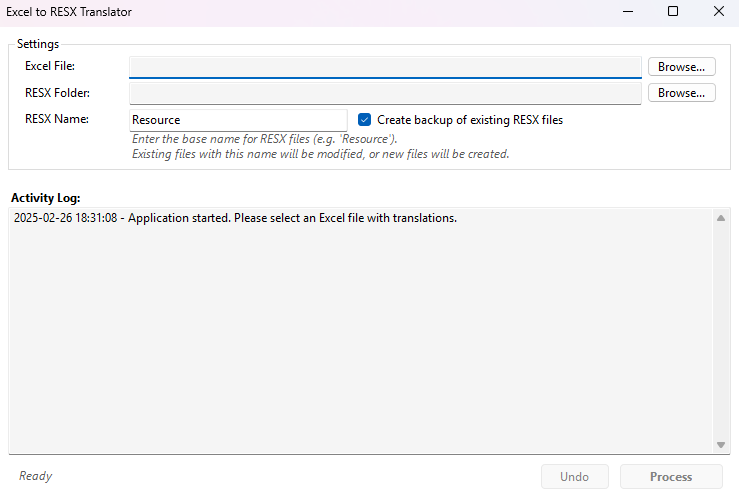
- Import translations from Excel files (.xlsx) to RESX files
- Update existing or create new RESX files
- Create backups of existing RESX files
- Preserve existing translations not found in the Excel file
- Undo changes with a single click
Excel files should be formatted like this:
| ResourceKey | default | sv | es | en | ... |
|---|---|---|---|---|---|
| Welcome | Welcome | Välkommen | Bienvenido | Welcome | ... |
| Goodbye | Goodbye | Adjö | Adiós | Goodbye | ... |
| ... | ... | ... | ... | ... | ... |
- First row: column headers with language codes
- First column: resource keys
- Other cells: translations
- Multiple RESX Sets: If you have different RESX files in the destination folder (e.g., 'Messages.resx', 'Table.resx'):
- Enter the specific name (without extension) in the "RESX Name" field (e.g., 'Table')
- If the specified name is not found, new files with that name will be created
- Only files matching that name pattern will be created or updated
Default Language Selection:
- A column named "default" will always be used as the default language (creates Name.resx)
- If no "default" column exists, "en" will be used as the default
RESX files will follow this pattern:
- Default language:
Name.resx - Other languages:
Name.{language-code}.resx
For example:
Resource.resx(English)Resource.sv.resx(Swedish)Resource.es.resx(Spanish)
- Launch the application
- Select your Excel file (browse or drag-and-drop)
- Select destination folder for RESX files
- Configure options:
- RESX Name: Name for your RESX files (files with this name will be created or modified if they exist)
- Create backup: Creates backups before modifications (required for Undo functionality)
- Click "Process Translations"
- Check the log for details
- Use "Undo" if needed
- Windows
MIT License - see LICENSE file for details